Wednesday, October 3, 2012

Need to know how to reference (or cite) information in your assignments?

Are you starting your assignments? Do you need to learn how to reference? Well here’s a quick guide to the Harvard Referencing System!

As students you will spend most of your time listening to information, theories and ideas that experts in your subject area have come up. You will be asked to write assignments and projects that include these ideas. Students are expected to use other authors’ ideas in their projects and assignments; but, when you do use another author’s idea you must reference (or cite) it.

We reference information in order to give credit to the author who came up with the idea. We do it to allow our readers to follow up on our sources of information. We do it because our assignment or project is an academic work and we must be able to backup what we say.

So, what kind of information do we need to reference?
  • Quotations: when we take the words of another writer, place them in inverted commas and copy them exactly into our own assignment – we must reference this
  • Paraphrasing: when we take the idea of another writer, write it in our own words and include it in our assignment – we must reference this
  • Graphs & diagrams: when we take a graph, an image or a diagram, from a print or online source, and include it in our assignment – we must reference this

How does referencing work?
The Harvard Referencing System is a two-step system.

Step 1: short citation
Where: within the text of the assignment or project
When: when you are writing your assignment, include a citation immediately after any reference to information you read in a book, a journal, a website or any published work
How: (author surname year of publication)

Example: there are two citations in this example – the information in the first sentence came from an online journal by Hughes and the information in the second sentence came from a book by Berkerian.

Psychological issues in the court room
by Jane Smith

Psychological issues arise at the pre-trial, trial and post-trial phases of the judicial process (Hughes 1998). It is vital that staff members are properly informed of the rights of the defendant throughout the process. Recent studies indicate that false confessions are “more prevalent among prior offenders” (Bekerian 2005).

Step 2: reference list
Where: at the end of the assignment or project
How: references look different depending on the source of the information; so a reference for information taken from a book looks different to a reference for information from a website or a DVD or a newspaper etc; this is because the reference acts as a map back to the source

Example: there are five references in this example – they are listed alphabetically by author surname; this makes it easy to locate the Hughesreference or the Berkerian reference

Anderson, G. (1981) Criminal minds. New York: Harvard University Press.

Bekerian, D.A. and Levey, A.B. (2005) Applied psychology: putting theory into practice. Oxford, England: Oxford University Press.

Carroll, S. (2001) The criminal justice system in Ireland. 4th ed. Dublin, Ireland: HarperCollins.

Hughes, T. (1998) Hearing the voice of the prisoner. Journal of juvenile offenders in the UK [online], 12 December 1998, 41 (2), available from: <http://www.jjo.com/123.htm> [accessed 24 February 2006].

O’Malley, M. (2006) An introduction to development education. Irish journal of secondary education. 91 (3), pp. 41-46.

In order to write a reference (step 2), you will need:
  • The source of information, i.e. the book, journal, website etc.
  • The templates (in this leaflet– also available in print opposite the library desk)

For instance, if I am writing a reference for this book – I find the template for a “book”, on my leaflet, and follow it exactly:


The template looks like this:
Author surname, First initial. (Year of publication) Title: subtitle. Place of publication: Publisher.

My reference looks like this:
Elliott, G. (2004) Global business information technology: an integrated systems approach. Harlow, England: Addison-Wesley.

Tuesday, October 2, 2012

Reading difficult material...

Are you starting your assignments this week?  Faced with some daunting reading?
Sometimes reading about a new topic can be difficult, but there are steps you can take to make it easier on yourself!  Check out the library's quick guide...


Monday, October 1, 2012

Finding what you need on the shelf


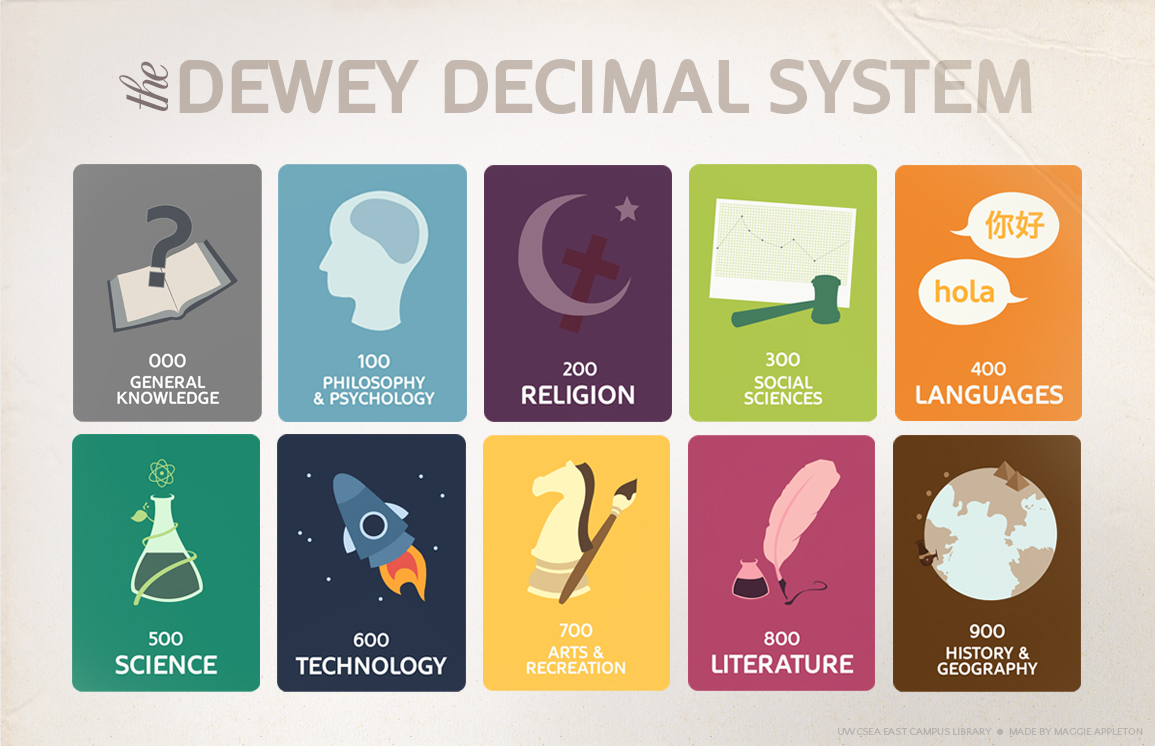
We use the Dewey Decimal Classification system to shelve material in ITB library.

The system was invented my Melvil Dewey in 1876 and is the most widely used library organisation system in the world.

The system groups books by topic, by dividing them into 10 basic categories, and each of those categories is further split into 10 categories, and so on.

000 General Knowledge

100 Psychology & Philosophy

200 Religion

300 Social Sciences & Folklore

400 Languages

500 Natural Science

600 Applied Science, Technology

700 Arts & Recreation

800 Literature

900 Geography & History
 
You may have noticed the small stickers on the spine of our books...this is it's unique identifyer called its 'call number' or 'class number'. It is made up of its Dewey code and the first 3 letters of the authors surname.


When you search for a book on our library catalogue you'll see details on:

Its location in the library, the type of loan permitted on it ('Loan Period'), whether or not it is on loan ('Status') and the books Class Number.


Books are shelved in ascending order, according to their Dewey Class Number.

Books with class numbers between 000-399 are shelved on level 2 on the group study side.

Books with class numbers between 400-999 are shelved on level 2 on the quiet study side.


Friday, September 28, 2012

Music to your ears...

Here's a fantastic TED-Ed video for a bright Friday morning!

The art of the metaphor


Thursday, September 27, 2012

New to the library?


Things you should know about...

ITB Library


We are open from 9.15am - 8.00pm Monday - Thursday and from 9.15 - 5.00pm on Fridays.
  
The library also houses the Student Information Desk (SID). This is where to go if you need forms stamped, letters from the college, general information etc... 
There are computers available to use in the library in the group study zone and the quiet zone. Just logon using your Student Number and your Password.

WIFI access is also available to users...just sign up using the form available at SID   
Printing & Photocopying is possible in the library...you just need to top up your account using a debit or credit card...(Instructions on how to do this are available at SID)
 As well as books, we also have audio visual material, journals and newspapers in the library.
 We also provide access to academic journals online...Guides on how to search our online databases are available from the library desk.
 To find a book in the library just go to the library homepage or use the OPAC terminals located throughout the library.
Searches are done using keywords [just like you would on Google!]  You can search by title, author, subject etc. In the results page, material will be listed along with where to find it on the shelf and whether it is readily available to borrow.

We shelve material in the library using the 'Dewey Decimal system'. A simple guide to this is available here


We also have a new tool on the library homepage called 'One Search'. This allows users to search our library collection and online academic journals all in one go...

We are here to help you...if you have any queries

More information about ITB library is available on the Library Hub

As a library user, we ask that you adhere to the following

The library is a place of study…We don’t like noise!


The Library is divided into Noise Zones
Group study area (Green Zone) – Group work is allowed, but only at a reasonable level of volume.

Quiet Study area (Orange Zone) – Students must work individually, noise to be kept to a minimum.

Silent Study Area (Red Zone) – Students must work in absolute silence

-Users who make excessive noise and disturb others will be removed from the library.

-Use of Mobile phones is not permitted.

Talking on mobile phones, or phones ringing in the Library, is strictly forbidden. They must be set to silent mode. There is an on-the-spot fine of €5 if a mobile rings or if a student is found talking on their mobile.

The library is not a restaurant!


Consumption of Food, Tea, Coffee and other drinks is not permitted. You can only bring water into the library.

If you want to have a social meeting with your friends, go to the canteen.

Remember to bring your ID card!


You will need your Student ID card each and every time you borrow material from the library. You will also need it at the Student Information Desk if you need any forms stamped etc…

Bring your books to the issue desk before taking them out!


We have a security system in place. You must ensure that all items have been checked out properly at the Issue Desk, or at the self-service checkout system. Improperly checked items will incur a fine of €5.00.

Long Loan items – fine of 40c per day.
Short Loan items – fine of 70c per day.
Day Loans – fine of €1 per day.


Items may be renewed twice, provided nobody else has reserved them and they are not overdue.
If you have fines on your account you will not be able to borrow until the fine is cleared.

You are responsible for what you borrow
Users have full responsibility for all Library materials borrowed on their ID card. Lost or damaged items will be charged to you.

Know your limits!
Full time and part time students may borrow up to 5 items at any one time. Postgraduate students may borrow up to 10.

Be fair…

PC access is granted to students with the understanding that they be used productively. They should be used for college related work only; otherwise you are depriving other students of the opportunity to get work done.

Help us to help you

Users of the library must comply with the instruction of library staff at all times. Aggressive, anti-social behavior directed towards staff or other students will not be tolerated.
Users should make themselves aware of the rules and report activities that breach them to staff or security.

Wednesday, September 26, 2012

Borrowing library books... it's child's play!

Have you borrowed a library book yet?  If not, here is some useful information!

What do you need?
You just need your student card.  Your student card is also your library card, and you are automatically a member of ITB Library when you start college. 

Just come to the library desk with your student card and the book you wish to borrow!


How many books can you borrow at a time?
Students can borrow up to 5 books, or items, at a time.  As well as books, you can borrow DVDs, CDs, reports, calculators, headphones etc.


How long can you borrow items for?
Most text books can be borrowed for 2 weeks at a time; these are long loans. 

In order to make the library books accessible to as many students as possible, some books are short loans.  At the start of each term we ask your lecturers to recommend core texts for short loan.  The first copy of each title is library use only; these books cannot be borrowed but they are always available in the library.  All other copies of the title are short loans; they can be borrowed for 1 week at a time.


What if you want a book for a little longer?
When a book is returned late, or after the due date, there are overdue fines.  Avoid this by renewing your books on or before the day that they are due to be returned.  We will renew your books up to two times so long as no other student has reserved them and they are not late.

Still have questions?  Email us at libraryinfo@itb.ie

Tuesday, September 25, 2012

Know your place on ITB Campus!!

Here is a quick guide to finding your way around campus


A block ('Aontas'): This building houses administrative functions such as the Admissions office, Fees and Grants office, Exams office etc. It also has lecture theatres, class rooms, and a board room. Computer and printer access is available in this building. Some lecturers have their offices in this building.

B Block ('Buntas'): This building houses the 'LINC', our Industry and Innovation Hub.

C Block ('Croi'): In this building you'll find the canteen, shop, bank, ATM, gym, and the sports hall. Upstairs you'll find the Students Union office, the coffee shop, the college nurse, access office, the careers office and the oratory.

D Block ('Doras') Amongst other things, this building houses the Caretakers office and the Horticulture workshop.

E Block ('Eolas') houses the school offices, lecture theatres and class rooms. Many lecturers have their offices in this building also.

F Block ('Fios') This building houses the library, the Student Information Desk (SID), Reception, the Marketing department, the Registrar's office, the President's office, the Heads of School and Security. It also houses a lecture theatre, class rooms, computer labs and a board room.

You can access computers, printing, class rooms and lockers throughout the campus. You should familiarise yourself with each building

Consult your timetables to know where you need to be! You can view your timetable here. Login using your Student number, no password required.